Posts
Squatter 35 — Hallomeme 2.0 👻
Catching Up with The Squatter (Part 3) Finally, we’re caught up with Squatter 35: Hallomeme 2.0 — a Halloween special full of meme-based humor with real teaching hacks underneath. From Drake’s grading face-off to Surprised Pikachu discovering NotebookLM, every meme ties back to making AI + AVID work for teachers. This one might be the most fun to date — a reminder that sometimes the best PD fits on a bathroom wall and makes you laugh while you learn. 📄 Download Squatter 35 (PDF) Which meme in this issue nailed your exact teacher life experience?
Squatter 34 — The Return of the Squat 💪
Catching Up with The Squatter (Part 2) Next in the catch-up series is Squatter 34: Return of the Squat . This one takes a movie-themed approach to Chromebook use in the classroom. It’s a lighthearted but practical look at how to keep Chromebooks from being the villain in your lesson — instead turning them into the supporting character that helps everything run smoothly. Think of it as your director’s cut for classroom tech management. 📄 Download Squatter 34 (PDF) If Chromebook use in your class was a movie genre, what would it be — comedy, action, or horror?
Squatter 33 — Prompt Engineering 🎯
Catching Up with The Squatter (Part 1) I’ll admit it — I’ve fallen a little behind posting Squatters here. They’ve still been popping up on campus, but not always making their way online. Over the next few weeks, I’ll be dropping one Squatter per week until we’re caught up. First up is Squatter 33: Prompt Engineering . This edition digs into the idea that AI is only as good as the questions we ask it. Better prompts = better outputs. Inside are teacher-friendly examples of how to craft prompts that save you time while still giving you usable results. 📄 Download Squatter 33 (PDF) What’s one classroom task you’d like to try writing a “perfect prompt” for?
Squatter 29 - This Is Hallomeme

Wow. Three Squatters behind. It really has been a while. I'll save the normal content, and just get to the Squatting. Squatter 29 - This is Hallomeme is all about staying vigilant against Phishing attacks. Another meme based Squatter, hopefully you catch on to some of the humor while learning important information. As usual, click on the link below for a full resolution PDF of Squatter 29.
AI Today
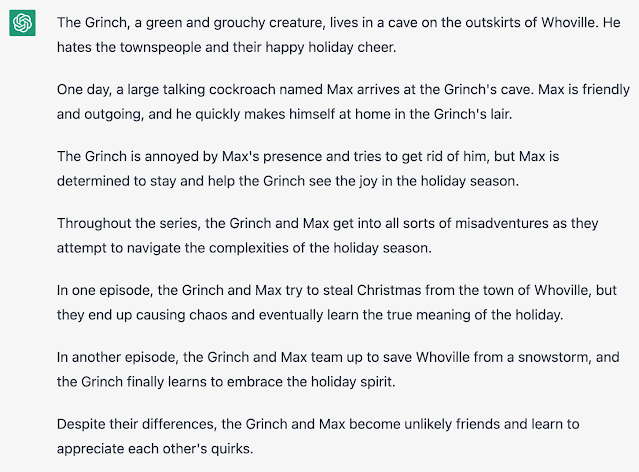
I wanted to take a minute to remind everyone that AI is not a future concept. It is here today. Over the holiday season, make some time to play on the website openai.com. It can write, chat, and create images based on prompts from users. It’s really good. Your students know may know about this. They may already be passing off AI writing as their own. Want to know how good it is? Here’s a couple examples. I told openAI to write a script for a sitcom featuring the grinch and a large talking cockroach. This is its response. Up next, I asked openAI If George Washington ran for President of the USA today, would he win the election. ELA Teachers, you can use this to your advantage. I asked for five writing prompts for seventh grade students about holiday adventures. This is what I got. Math teachers, I didn’t leave you out either. I asked for five word problems that require multi-step equations to solve. Moving on to images, I asked for a cell-shaded image of an as...
Book Review - Educational Duct Tape by Jake Miller
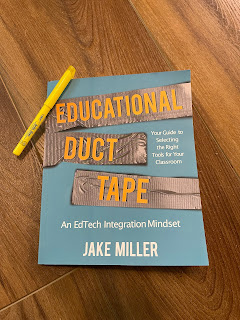
If you're in Education, and have paid any attention whatsoever to the EdTech space, you've probably heard of Jake Miller. His website ( jakemiller.net ) and podcast ( Educational Duct Tape ) are staples in the EdTech community. Seriously, if you haven't checked out any of his stuff yet, you're in for a treat. I could, and probably should, write a full review about the website and podcast, but today it about the book. What follows is my loose, hastily written, randomly ordered thoughts about the book. I'd do a better job of organizing this, but I've got two young ones waiting on me to come play Candy Land. If you're an educator, this book should be on your reading list. Yes, it's full of tech tips, but tech changes rapidly. Yes, it's full of recommended tech tools to fit certain needs, but again, that tech will change in the future. The real value here is in the recounting of Jake's experience as a developing educator. His repeated mantra of ...
Ed Tech 180 #3 - Text Transcripts in Google Meet using Otter.ai

Been in a Google Meet lately? Ha... yeah... I know... that's like asking if you've taken a breath or seen the sky lately. Ever wanted a transcript of that meet for reasons? Maybe you want to make a study guide from a lesson you recorded in Meet. Maybe you wanted to provide a read-along text for a vide you created. Maybe you wanted to offer your students the ability to read through something you taught via Google Meet for clarity and deeper understanding. Now, with the power of Otter.ai (a Freemium tool) you can have it. Take a look!
Jamboard in Google Meet

Good news everybody! Jamboard is now a part of Google Meet. Take a look at the incredibly brief and low quality demonstration of how to create a Jam from within a Meet, and how to take a look at the Jam after the Meet has finished.
Quickie - Changes to Google Meet

Oh man, I'm excited. Some of the changes to Meet that Google have been promising us are finally rolling out. Take a look at the video below for more details. Sorry for the quick and rough production value here. I wanted to get this out to teachers as soon as I could. You have no idea how often I get asked about some of these features. This is AAAAAAAAAAAAAWEWWEeEEEEEEEEEEsSOSSOMMMMMMMMMMEEEEEEEEEEEEE!!!!!!!!!!!!!!!!!!!!!!!!!!!!!!!!!!
Tech Tip of the Week - Feb. 28, 2020
The Internet is the wild west. It can be a bit… uncivilized. How do we teach our students, as well as our own children… and ourselves for that matter, to bring a touch of civilization to the internet? How do teach and learn how to protect ourselves from those internet ruffians? Google to the rescue! Go check out beinternetawesome.withgoogle.com. (That’s “be internet awesome (dot) with google (dot) com” without the spaces.) Be Internet Awesome covers topics like being kind, but not oversharing, securing your accounts, and finding truth on the internet. It’s even got games to teach the concepts. Yes, it seems like it’s aimed at students younger than High School, but if they haven’t learned it by now, they could use the exposure. Consider this for your own children as well.
Tech Tip of the Week - Feb. 21, 2020

I fought against this one for a long time, but it has more value than I originally thought as a professional learning tool. I’m talking about Twitter. Just like every other “social media” platform, it is what you make of it. At first, it can be a bit like trying to sip water from a firehose. Realize you don’t have to read it all, so just relax and take whatever you get whenever you get the chance. The beauty of Twitter is that you will see what you follow. So here’s what you do… make a Twitter account specifically for professionals worth following. Here’s some recommendations… follow @DrBradJohnson, @jmattmiller, @teachbetterteam, @googledocs, @ericcurts, @burgessdave, @shakeuplearning, @JakeMillerTech, @danielrivera, and of course, @itsthemitchell. Want a crash course in using Twitter as a Professional Learning Network? Hit me up!
Your Digital Footprint

Your digital footprint. According to techterms.com, it is "a trail of data you create while using the internet. It includes the websites you visit, emails you send, and information you submit to online services." Considering that, your digital footprint includes; every email you have sent, every tweet you've posted, every Facebook status update, every comment, every video, every website you've visited, every shared post, every time you shared misinformation with knowing, every reply, every picture, every thing you have ever done on the Internet, ever, ever, ever, ever. Here's is what I tell my students are the two biggest things to keep in mind when thinking about your digital footprint... 1. The Internet is all knowing. 2. The Internet is forever. Imagine this. You (yes, the real you sitting there hopefully reading this right now) have an imaginary backpack. That imaginary backpack keeps a list of every thing you do, everywhere you go, and everything you...
How to choose a STRONG password.

tl;dr 1. Don't use a garbage password. 2. Use a strong password. 3. Use different passwords for each account. 4. Consider a password manager. 5. NEVER give your password to ANYONE! 6. Check out howsecureismypassword.net . 7. Check out haveibeenpwned.com Hello Internet. I hope you are having a beautiful day. I'd like to talk to you about your passwords for a minute. I don't mean to be ugly about it, but I need to put this in no uncertain terms. Some of you have awful passwords. Terrible. Awful. Get your act together. First, we're going to talk about what makes a terrible password. Splashdata, an internet security company, maintains a list of the most common passwords each year. Let's take a look at some of the perennial greatest hits. #1. 123456 #2. password #3. 123456789 #4. 12345678 Let's jump around a bit... #8. sunshine #9. qwerty #10. iloveyou #12. admin #18. monkey #20. !@#$%^&* - This one lo...