Posts
Squatter 34 — The Return of the Squat 💪
Catching Up with The Squatter (Part 2) Next in the catch-up series is Squatter 34: Return of the Squat . This one takes a movie-themed approach to Chromebook use in the classroom. It’s a lighthearted but practical look at how to keep Chromebooks from being the villain in your lesson — instead turning them into the supporting character that helps everything run smoothly. Think of it as your director’s cut for classroom tech management. 📄 Download Squatter 34 (PDF) If Chromebook use in your class was a movie genre, what would it be — comedy, action, or horror?
Squatter 32 - Is A.I. Cheating?

Keeping up on the rapid fire posting of squatters. Don't expect it to continue. I was WAY behind on posting. That being said, this Squatter asks the question what exactly is "cheating" when it comes to A.I.? It's not as black and white as you would think. Teachers need to consider this question on a continuum, rather than a yes or no. Check out Squatter 32 to see what I mean. Drop a comment and share your thoughts. Do you have experience with students trying to pass of AI generated work as their own? What do you do in your classes to encourage responsible use of AI... or do you just ban it and pretend it doesn't exist? As usual, click the image below for a full-sized PDF of Squatter 32.
AI Today
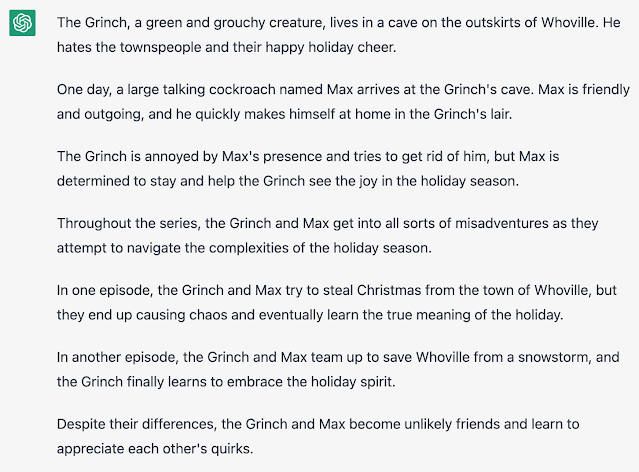
I wanted to take a minute to remind everyone that AI is not a future concept. It is here today. Over the holiday season, make some time to play on the website openai.com. It can write, chat, and create images based on prompts from users. It’s really good. Your students know may know about this. They may already be passing off AI writing as their own. Want to know how good it is? Here’s a couple examples. I told openAI to write a script for a sitcom featuring the grinch and a large talking cockroach. This is its response. Up next, I asked openAI If George Washington ran for President of the USA today, would he win the election. ELA Teachers, you can use this to your advantage. I asked for five writing prompts for seventh grade students about holiday adventures. This is what I got. Math teachers, I didn’t leave you out either. I asked for five word problems that require multi-step equations to solve. Moving on to images, I asked for a cell-shaded image of an as...
Squatter 18 - Twelve Days of TechTips
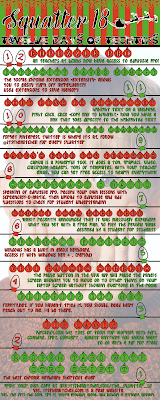
On the first day of Christmas, Tall Tech Guy gave to me... SQUATTER 18 - Twelve Days of Tech Tips! Christmas themed and posted to your favorite places to R&R (Read and Relax) as well as shared here on the internet for everyone. Yes, you can even sing this one. Don't be shy. Belt it out the best you can, where ever you're reading the Squatter. Click the link below for a full sized version.
Book Review - Educational Duct Tape by Jake Miller
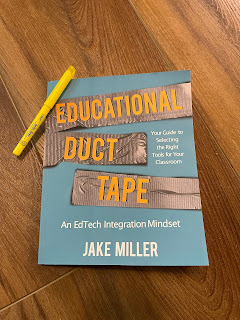
If you're in Education, and have paid any attention whatsoever to the EdTech space, you've probably heard of Jake Miller. His website ( jakemiller.net ) and podcast ( Educational Duct Tape ) are staples in the EdTech community. Seriously, if you haven't checked out any of his stuff yet, you're in for a treat. I could, and probably should, write a full review about the website and podcast, but today it about the book. What follows is my loose, hastily written, randomly ordered thoughts about the book. I'd do a better job of organizing this, but I've got two young ones waiting on me to come play Candy Land. If you're an educator, this book should be on your reading list. Yes, it's full of tech tips, but tech changes rapidly. Yes, it's full of recommended tech tools to fit certain needs, but again, that tech will change in the future. The real value here is in the recounting of Jake's experience as a developing educator. His repeated mantra of ...
Squatter 17 - Vivi

Full disclosure, I had never heard of Vivi before my current position. Vivi is three things. It is a little blue box that attaches to any video device with an HDMI input you have in your classroom. Projector? Sure. Touch Panel? Even better because Vivi will pass the touch inputs back to your computer. It is an app that you install on your computer, as well as push out to student devices that allows screen sharing, annotation, assessment, feedback... lots of stuff. It is a web-portal that allows access to the data you've collected from your students. Vivi is a capable platform. The more you use it, the more you think of other things you can do with it. With that in mind, Squatter 17 is all about things you can do with Vivi. I know it might not apply to you, but if you're in the ed-tech space, and you don't know about Vivi, consider this a primer. As usual, click the image below for a larger version, and be Excellent to each other.
EdTech 180 #4 - Google Chrome Bookmarks Bar

EdTech 180 #4 - Google Chrome Bookmarks Bar The Bookmarks Bar in Chrome is much more useful than I realized. I was working with a student on saving some bookmarks, when I noticed options I have never seen before. Keep reading below, or watch the video (or both) to see what I mean. You can show or hide the bookmarks bar by clicking the three vertical dots (I like to call it the snowman) in the top right corner of the Google Chrome Browser, then click bookmarks, then “show bookmarks bar”... or by using the keyboard shortcut to toggle it on and off. That’s Ctrl+Shift+B for windows or ChromeOS users, or Command+Shift+B for the MacOS users out there. I noticed that while the controls for showing or hiding the bookmarks bar still work in a new tab, they did not take effect until you loaded some content in the tab. Note that the bookmarks bar always shows on the new tab page, even if you’ve hidden it in other tabs. Once you load content into the tab, the bookmarks tab will go away. To add a s...
Tall Tech Guy vol.2 - Make it Last

I've been talking to teachers who mention our student Chromebooks not being able to go the distance in a day. True, some of those Chromebooks are older and are ready to be put out to pasture. Yes, we're demanding more from our devices than ever before. No, we don't just need to sit back and accept poor battery life in our devices. In this episode of Tall Tech Guy, we'll look at four quick tips to help that old, tired Chromebook go the distance. Click on the image below for a full sized PDF of TTG 2.
Jamboard in Google Meet

Good news everybody! Jamboard is now a part of Google Meet. Take a look at the incredibly brief and low quality demonstration of how to create a Jam from within a Meet, and how to take a look at the Jam after the Meet has finished.
Quickie - Changes to Google Meet

Oh man, I'm excited. Some of the changes to Meet that Google have been promising us are finally rolling out. Take a look at the video below for more details. Sorry for the quick and rough production value here. I wanted to get this out to teachers as soon as I could. You have no idea how often I get asked about some of these features. This is AAAAAAAAAAAAAWEWWEeEEEEEEEEEEsSOSSOMMMMMMMMMMEEEEEEEEEEEEE!!!!!!!!!!!!!!!!!!!!!!!!!!!!!!!!!!
The Squatter - vol.9 - Keyboard Shortcuts (again)

Okay, world. I know you've been waiting patiently. It's finally time for Squatter NINE! If Squatter 9 looks like a re-hash of Squatter 1... well... it... ummm... sort-of... IS. That's on purpose. This is posted in private places for R&R (Reading and Relief) around my campus. This is a reminder of all the great things you can do quickly with the push of a few buttons. Note that this time around, I included shortcuts for Windows, ChromeOS, and MacOS. That being said... c'mon Apple. We'll need keyboard shortcuts for snap! You're just about to roll out Big Sur... Can you add just one more feature before it drops? It can't be that hard. Well, that's enough babble for now. Enjoy your R&R time.
Tall Tech Guy - Vol 1

Hopefully, you've seen The Squatter by now. If not, go back through my post history a little ways. If you're not in the know, The Squatter is my attempt at clever Potty PD for the teachers I work with. This year, with all the extra challenges we're facing due to COVID, I thought it would be good to put out a few infographic style posters to help students properly care for their devices. Here is the first of those creations. Speaking of creations, I am also learning a new platform while creating this content. This is the first graphic I created using Keynote instead of Canva. I'm not well versed enough to offer a pros and cons of each platform, but I intend to see just how far I can get creatively in Keynote. I like that it is an offline solution. Anyway, here you go. Tall Tech Guy - Vol 1.